
When a DC charging station starts up, the machine makes a loud noise and the screen displays normally, but there is no current output. This is indeed a typical problem of core function failure. Based on the working principle of the ev charging station and common fault types, the following possible causes and troubleshooting directions can help you systematically diagnose the problem:
I. Power Input Issues (Prioritize checking external power supply)
1. Unstable input voltage or phase loss:
DC charging piles require a stable three-phase 380V AC input (within ±15% deviation). If the power grid fluctuates, there is poor contact, or one phase is missing, the module may pass self-tests but fail to output power.
Simple verification: Use a multimeter to measure whether the three-phase voltage at the charging station’s input terminal is balanced (approximately 220V per phase), and whether the neutral/ground wire is reliable.
2. Aging power lines or loose terminals:
Long-term high-current operation can easily lead to oxidation of the input terminals and embrittlement of the cables due to heat. Even if the electric car charging station makes a “humming” sound (possibly due to transformer vibration), the actual current transmission may be interrupted.
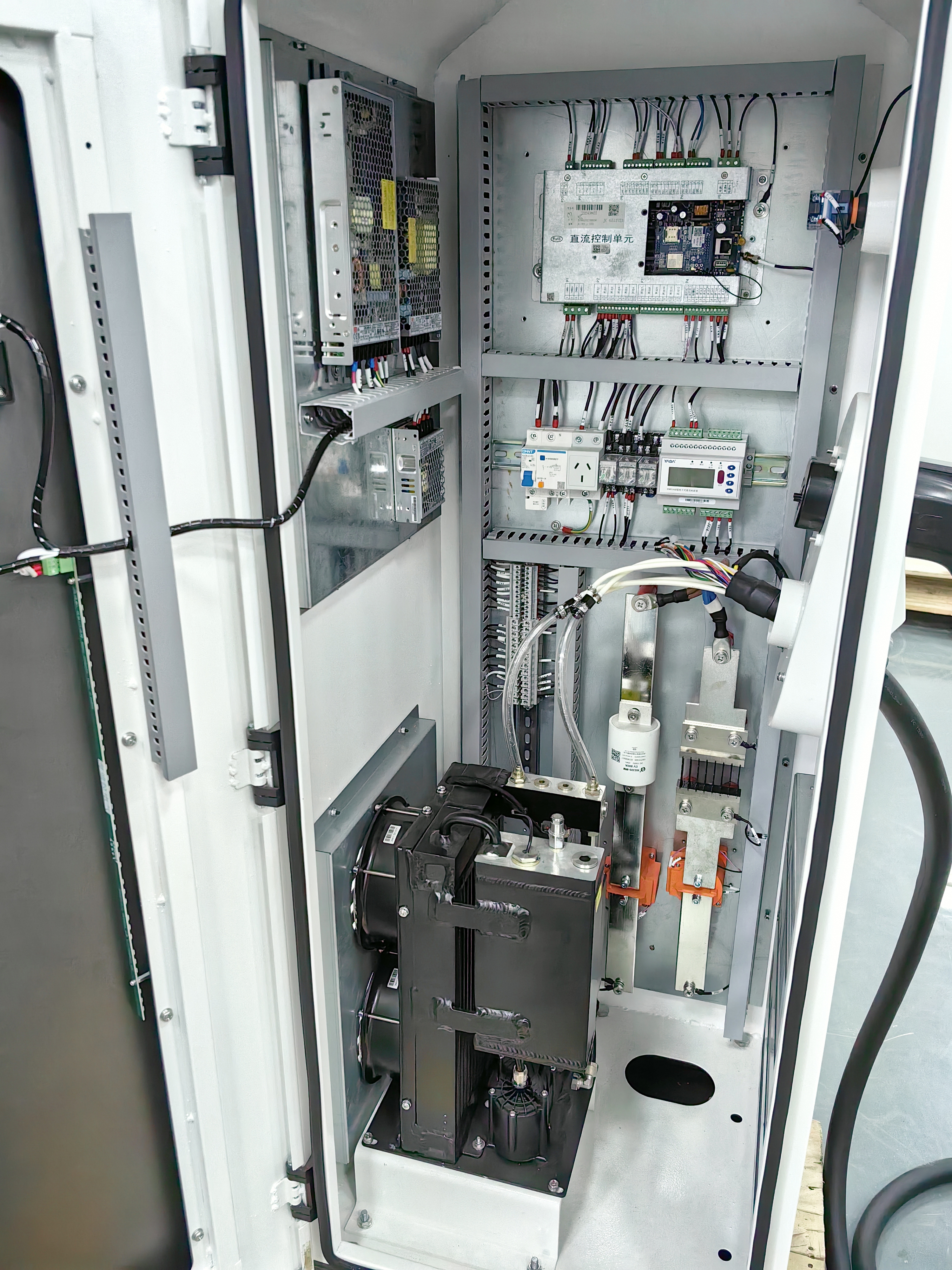
II. Power module and core component failures (accounting for over 70% of all failures)
1. Partial damage to the charging power module:
The DC fast charging station consists of multiple parallel power modules. If some modules fail (such as IGBT burnout or capacitor bulging), the charging station may still “operate” and produce a humming sound from the cooling fans, but the total output current will drop sharply or even become zero.
Key indicator: Touch the cabinet casing to feel the temperature – normally, there should be even heating; if a local area is cold, it indicates that the corresponding module is not working.
2. Relay/contactor sticking or failure:
If the high-voltage relay responsible for connecting the DC output has oxidized contacts or a broken coil, it will prevent current from reaching the vehicle, and may be accompanied by a clicking sound (repeated failure to engage).
Relays typically have a lifespan of approximately 100,000 cycles, and are prone to failure in commercial charging stations with frequent start-stop cycles.
3. DC Fuse Blows:
Overload or short circuit will trigger the fuse’s protective blowing, directly interrupting the output circuit. The fuse status needs to be checked by opening the cabinet (commonly found at the output terminal of the power module).
III. Control and Communication System Failures (The root cause of the seemingly “normal” appearance)
1. BMS Communication Handshake Failure:
The charging station and the vehicle’s battery management system (BMS) need to continuously communicate and negotiate the current. If there is CAN bus interference, protocol incompatibility, or deformed interface pins, the charging command may fail to execute, even if the charging station self-test is normal.
Troubleshooting steps: Test with a different vehicle or charging gun to observe if the failure occurs with a specific combination.
2. Software malfunction or parameter errors:
The control board program may malfunction at high temperatures, displaying “running” but failing to send power commands. Try restarting the charging station (disconnecting the power for at least 5 minutes) to reset the system.
IV. Security protection mechanism triggered (underlying reason)
1. Temperature Protection Activated:
When the module has poor heat dissipation (e.g., fan blockage, obstructed airflow), the temperature sensor triggers over-temperature protection. At this time, the fan may run at high speed (producing a noticeable “whirring” sound), but the output is forcibly shut off.
Cleaning focus: Clean the dust from the filter screen and check if the fan bearings are dry or clogged with grease.
2. Insulation test failure:
If the insulation of the charging station or cable deteriorates (especially in humid environments), the safety mechanism will disable the output to prevent the risk of electric leakage.
V. Environment and External Factors
Vehicle requiring insufficient current: In a few cases, the vehicle’s BMS actively limits the charging current due to abnormal battery temperature (below 0℃ or above 45℃), showing a current close to 0A.
Charging cable or vehicle socket malfunction: Malfunctions in the charging connector temperature sensor or electronic lock may interrupt charging.
Systematic troubleshooting steps (from easiest to most difficult)
1. Basic checks:
Confirm that the input power supply voltage is stable (three-phase balanced ≥ 360V).
Unplug and replug the charging gun, and observe if the indicator light on the gun head is abnormal.
Test with a different vehicle to rule out vehicle-related problems.
2. Internal Visual Inspection (requires power off and service request):
Open the cabinet door and check the fuse status and any signs of terminal burning.
Check for bulging capacitors and blackened relays.
Clean the fan and heat sink, and manually rotate the fan to test its flexibility.
3. Professional Repair Recommendations:
Power Module Testing: Use an oscilloscope to test the module output waveform; faulty modules need to be replaced (cost approximately 500 RMB/module).
Control Board Diagnosis: Flash the latest firmware and test the CAN communication messages.
Insulation Testing: Perform a 2500V withstand voltage test on the DC bus. According to repair data, power module damage (approximately 40%) and relay failure (approximately 30%) are the most common causes of this type of fault.
Post time: Jan-28-2026


